
The My Profile page is where you can update your account and other information. This information may be updated at any time, and you will receive a notification email each time you save changes to your account.
 Do note that if you have accounts on multiple systems, you will have to update each one individually.
The My Profile page will always have a Status section of your profile.
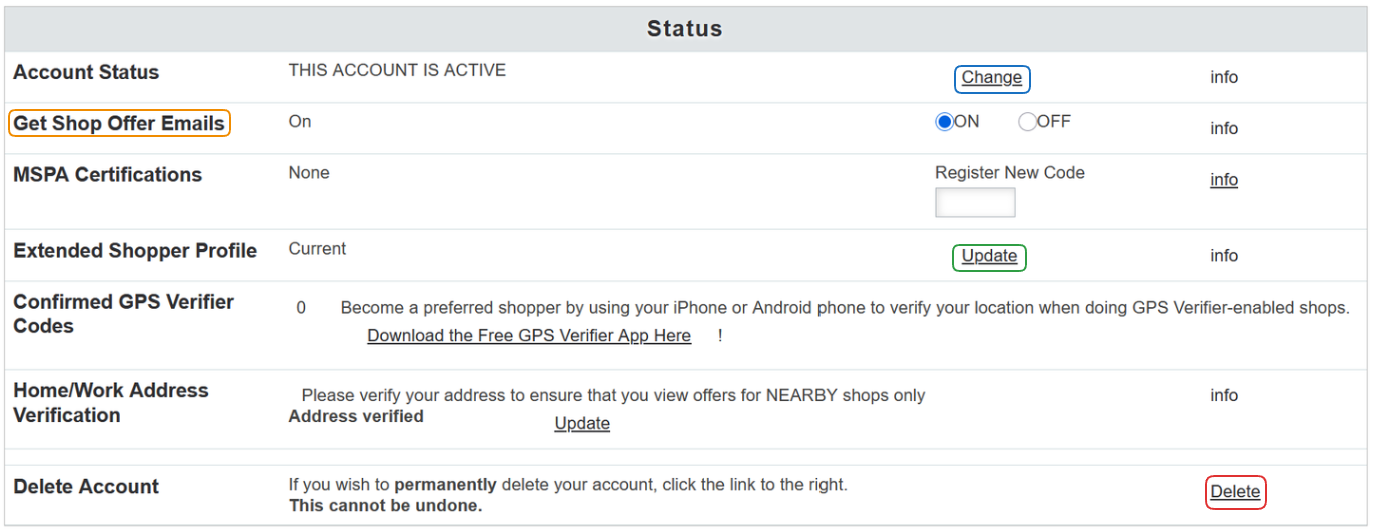
Here, you can change your Account Status by using the Change button on the right column.
You can set the account status to active or deactive, but keep in mind that a Mystery Shopping Company can also deactivate your account. Please contact them directly about the matter if you have questions as to why.
To opt in or out of shop offer e-mails, use the radio button in the Get Shop Offer Emails row.
To update or change the details of your Extended Shopper Profile, use the Update button in the right column. Filling in this additional information can qualify you for a wider variety of shops.
Last, if you want to permanently delete your account, use the Delete button. Please keep in mind that this is not reversible!
Other sections of the profile page include:
- Basic Account Information
This includes information such as your first and last name, password, your e-mail, and your location information. - Payment Information
In this section, you would input the information about the preferred payment method. - Demographic Information and, Additional Information
What appears in these two sections is defined by a Mystery Shopping Company, and can vary from one system to the next. - Area Codes
You are asked to provide a list of area codes or postal codes in which you are willing to do shops. You are not required to specify any area/postal codes, but the more you list, the more shop offers you will receive. - Platform Privacy Policy
This is the LiveShopper's Privacy Shield Policy. - Independent Contractor Agreement
If a Mystery Shopping Company has their own policy/agreement, it will be visible in this section.
To update your shopper profile and save changes, use the Edit Shopper Profile button at the bottom.